Email that knows your store
Send to people who asked to hear from you, fill templates from your catalog, and let Claude draft the words for you to approve.
How it works
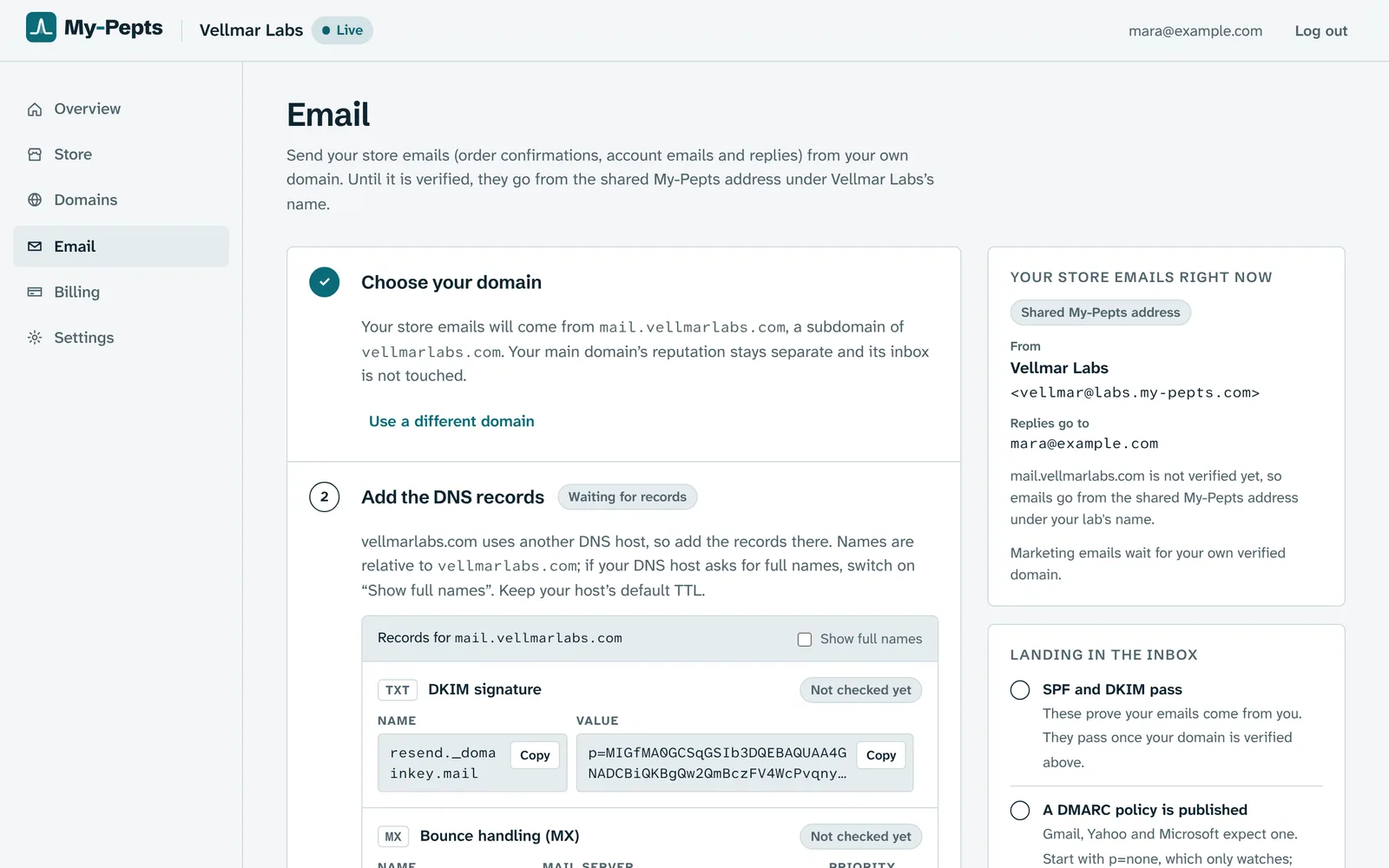
Step 1: Send from your own domain
Your store's emails go out under your lab's name from a domain of your own. Add the records the Email page shows, and once the domain is verified your campaigns can go out too.
Step 2: Build an audience from a few rules
Bought this but never that, no order in sixty days, spent over an amount, an open basket: stack the rules and the count updates as you go. Campaigns only ever reach people who subscribed, and consent is checked again at the moment of sending.
Lapsed buyers of Peptide AIn this audiencesubscribers, checked again at sendStep 3: Pick a template, choose the products
New stock, back in stock, sale or new listing. The names, sizes in stock and prices fill in from your catalog, and when a delivery is counted in, a new stock email is drafted and waits for you to check it.
TemplateNew stockBack in stockSaleNew listingNew stock is inThree of our research lines are back on the shelf.Step 4: See what happened to every email
Each email shows whether it was delivered, opened or bounced. Every attempt is logged, failures included, and one that failed can be sent again from its row.
OpenedDeliveredOpenedBouncedDeliveredStep 5: Claude drafts the words
Write one line about what the email is for and Claude drafts the subject and the message in your store's voice. The product list and every price come from your catalog, so the AI never sets a price.
One line for ClaudeAnnounce this week's restock, friendly and shortStep 6: Replies with the order in front of it
Customer emails, contact form messages and your replies sit in one inbox, grouped into conversations. Claude drafts a reply with the customer's orders and tracking beside it, leaves anything it cannot find as a note for you, and you send it.
Jordan HarperHi, has my order shipped yet? Thanks!

What it does
Untick anyone before you send
See exactly who an audience reaches before you start, and leave people out of one email without changing the saved audience.
Sends in batches, never twice
A campaign fixes its list of recipients when you press Start and goes out in batches. Close the tab and it pauses; resume and it carries on where it stopped, so nobody gets it twice.
Order emails, ready and editable
Order confirmations, shipping notices and account emails come written. Change any of them in the admin, preview it, and go back to the original whenever you like.
Bounces and complaints stop themselves
An address that bounces for good or marks you as spam is added to your suppression list, so the store stops writing to it without you doing anything.
A nudge for Hotmail and Outlook
Those inboxes are quick to file shop emails as Junk, so customers with Hotmail and Outlook addresses are reminded to look there, at checkout and after it.
Where AI helps
Drafts and readings you check. Nothing goes out until you press the button.
Save any email as a template
Claude turns an email you liked into a reusable template, putting placeholders where the products, the count and the discount code were and changing nothing else.
Certificates when a customer asks
When a reply needs a certificate of analysis, Claude can attach the right one from the certificates you have on file.
You approve every send
Every draft lands in the editor. You read it, change what you like and send it yourself. Claude never sends anything on its own.
Try it on your own catalog
Your store is live on yourlab.my-pepts.store seconds after you name it, and selling from A to Z in about 20 minutes.
More features
- StorefrontA complete storefront for research peptide labs: per-size product pages, certificates, checkout rules and country stores from day one.
- BrandingYour name, mark and colors carried through the storefront, checkout and order emails, with photoreal vial renders and designers on hand when you want them.
- Order managementAn orders list that tells the truth, a packing bench on your phone, and real profit on every parcel.
- Suppliers & stockPrice lists from a WhatsApp screenshot, stock orders from a quote, parcels followed to your door and batches told apart by their labels, with Claude doing the typing.
- Baskets & journeysEvery basket, every visit and every step toward checkout, read as one timeline per visitor.
- Google AdsA live Google Ads panel, every click followed to its order, paid orders sent back as conversions, and an ad landing page that never names a compound.
- ShippingTracking numbers that fill themselves in, Royal Mail's updates passed on in your name, and orders that move to shipped and delivered on their own.